api gateway alarm
api gateway alarm
API Gateway에 threshold를 생성해 늦게 처리된 요청에 한해 요청 정보를 이메일로 전송하도록 했다. 구성은,
API Gateway > Cloudwatch Alarm > Lambda > SNS
이렇게 했다.
API Gateway 액세스 로깅 활성화
API Gateway의 기본 로그를 사용해서는 필요한 요청 데이터를 뽑아내기가 어렵다. 사용자 지정 액세스 로그를 활성화 해 JSON으로 로그를 생성하면 Lambda에서 데이터에 쉽게 접근할 수 있다. 먼저 액세스 로그를 전달받을 Cloudwatch 로그 그룹을 생성하고 arn을 복사해두자. 그리고 알람을 생성할 API의 스테이지로 와서 로그 설정 편집을 누르고 사용자 지정 액세스 로깅을 활성화 한다.
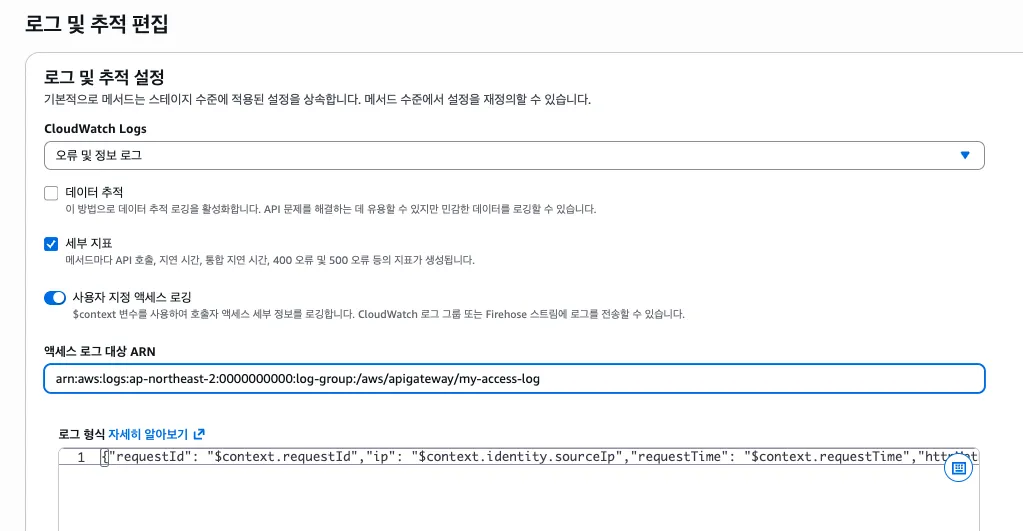
액세스 로그 대상 arn에 아까 생성한 로그 그룹의 arn을 입력한다. 로그 형식은 한 줄로 작성해야 하는데 아래와 같이 작성했다.
{"requestId": "$context.requestId","ip": "$context.identity.sourceIp","requestTime": "$context.requestTime","httpMethod": "$context.httpMethod","resourcePath": "$context.resourcePath","path": "$context.path","queryString": "$context.queryStringParameters","status": "$context.status","responseLatency": "$context.responseLatency","integrationLatency": "$context.integrationLatency"}AWS Document에서 사용가능한 옵션과 텍스트 포맷을 더 확인할 수 있다.
연결이 잘 되면 API 요청이 들어올 때 마다 생성된 로그 그룹에 JSON 형식의 로그가 전달된다.
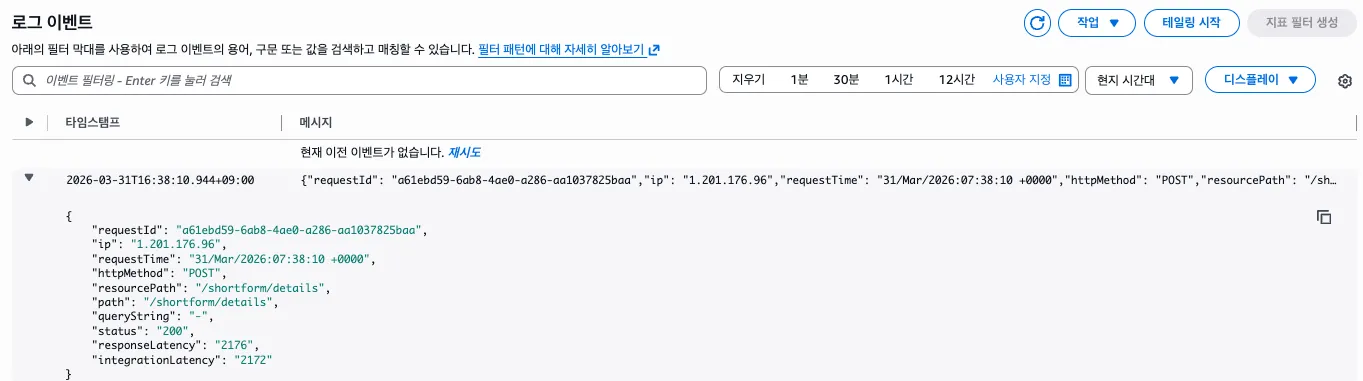
위에 작성한 로그 형식과 동일한 JSON이 보인다.
SNS 주제 & 구독 생성
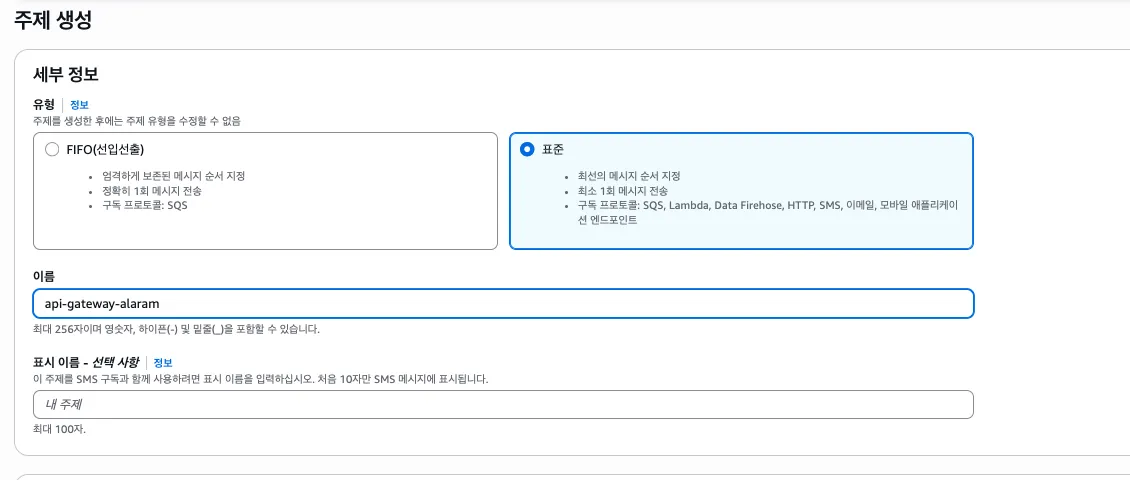
순서가 중요하지 않기 때문에 표준 주제로 생성한다. 주제를 생성했다면 내부에 구독을 생성해준다.

프로토콜은 이메일로 선택해 알람을 전달받을 이메일 주소를 입력한다.
액세스 로그를 읽어 SNS 전송하는 Lambda 작성
Lambda 함수를 생성한다.
import {
CloudWatchLogsClient,
StartQueryCommand,
GetQueryResultsCommand,
} from "@aws-sdk/client-cloudwatch-logs";
import { SNSClient, PublishCommand } from "@aws-sdk/client-sns";
const logsClient = new CloudWatchLogsClient({ region: process.env.AWS_REGION });
const snsClient = new SNSClient({ region: process.env.AWS_REGION });
// ── 환경변수로 관리 ──────────────────────────────────────
const CONFIG = {
logGroupName: process.env.LOG_GROUP_NAME, // /aws/apigateway/your-api
latencyThreshold: Number(process.env.LATENCY_THRESHOLD) || 2500,
lookbackMinutes: Number(process.env.LOOKBACK_MINUTES) || 5,
snsTopicArn: process.env.SNS_TOPIC_ARN, // arn:aws:sns:ap-northeast-2:123456789:latency-alert
maxResults: 10,
};
// ── 메인 핸들러 ──────────────────────────────────────────
export const handler = async (event) => {
console.log("Event:", JSON.stringify(event, null, 2));
try {
const alarmInfo = parseSnsEvent(event);
const now = new Date();
const slowRequests = await querySlowRequests(now);
await sendAlertEmail(alarmInfo, slowRequests, now);
return { statusCode: 200, body: "Alert sent successfully" };
} catch (err) {
console.error("Error:", err);
throw err;
}
};
// ── SNS 이벤트 파싱 ──────────────────────────────────────
function parseSnsEvent(event) {
const raw = event?.Records?.[0]?.Sns?.Message;
if (!raw) throw new Error("SNS message not found");
try {
return JSON.parse(raw);
} catch {
return { AlarmName: "Unknown", NewStateReason: raw };
}
}
// ── CloudWatch Logs Insights 쿼리 ────────────────────────
async function querySlowRequests(now) {
const endTime = Math.floor(now.getTime() / 1000);
const startTime = endTime - CONFIG.lookbackMinutes * 60;
const query = `
fields @timestamp, httpMethod, path, queryString,
responseLatency, integrationLatency, ip, requestId, status
| filter responseLatency > ${CONFIG.latencyThreshold}
| sort responseLatency desc
| limit ${CONFIG.maxResults}
`;
// 쿼리 시작
const { queryId } = await logsClient.send(
new StartQueryCommand({
logGroupName: CONFIG.logGroupName,
startTime,
endTime,
queryString: query,
})
);
// 쿼리 완료 대기 (최대 15초)
return await pollQueryResults(queryId);
}
async function pollQueryResults(queryId, maxAttempts = 15) {
for (let i = 0; i < maxAttempts; i++) {
await sleep(1000);
const result = await logsClient.send(
new GetQueryResultsCommand({ queryId })
);
if (result.status === "Complete") {
return result.results.map((row) =>
Object.fromEntries(row.map(({ field, value }) => [field, value]))
);
}
if (result.status === "Failed" || result.status === "Cancelled") {
throw new Error(`Query ${result.status}: ${queryId}`);
}
console.log(`Polling... attempt ${i + 1}, status: ${result.status}`);
}
throw new Error("Query timed out");
}
// ── SNS 이메일 발송 ──────────────────────────────────────
async function sendAlertEmail(alarmInfo, slowRequests, now) {
const subject = `[ALARM] API Gateway 응답 지연 감지 - ${alarmInfo.AlarmName ?? ""}`;
const message = buildEmailText(alarmInfo, slowRequests, now);
await snsClient.send(
new PublishCommand({
TopicArn: CONFIG.snsTopicArn,
Subject: subject,
Message: message,
})
);
console.log("SNS message published to:", CONFIG.snsTopicArn);
}
// ── 이메일 텍스트 빌더 (SNS는 plain text) ────────────────
function buildEmailText(alarmInfo, requests, now) {
const timeStr = now.toISOString().replace("T", " ").slice(0, 19) + " UTC";
const lines = [
`========================================`,
` API Gateway 응답 지연 알람`,
`========================================`,
`알람명 : ${alarmInfo.AlarmName ?? "-"}`,
`발생 시각 : ${timeStr}`,
`임계값 : ${CONFIG.latencyThreshold}ms 초과`,
`조회 범위 : 최근 ${CONFIG.lookbackMinutes}분`,
`원인 : ${alarmInfo.NewStateReason ?? "-"}`,
``,
`----------------------------------------`,
` 느린 요청 목록 (latency 높은 순, 최대 ${CONFIG.maxResults}건)`,
`----------------------------------------`,
];
if (requests.length === 0) {
lines.push("조회된 요청 없음 (로그 수집 지연일 수 있음)");
} else {
requests.forEach((r, i) => {
lines.push(
`[${i + 1}]`,
` Method : ${r.httpMethod ?? "-"}`,
` Path : ${r.path ?? "-"}`,
` Query : ${r.queryString ?? "-"}`,
` Latency : ${r.responseLatency ?? "-"} ms`,
` Integration: ${r.integrationLatency ?? "-"} ms`,
` Status : ${r.status ?? "-"}`,
` Client IP : ${r.ip ?? "-"}`,
` Request ID : ${r.requestId ?? "-"}`,
``
);
});
}
lines.push(`========================================`);
return lines.join("\n");
}
// ── 유틸 ─────────────────────────────────────────────────
function esc(str) {
return String(str ?? "")
.replace(/&/g, "&")
.replace(/</g, "<")
.replace(/>/g, ">")
.replace(/"/g, """);
}
function sleep(ms) {
return new Promise((resolve) => setTimeout(resolve, ms));
}Lambda 구성 메뉴에서 환경변수만 추가하면 된다.
LOG_GROUP_NAME: 아까 생성한 액세스 로그 cloudwatch 로그 그룹 name SNS_TOPIC_ARN: 아까 생성한 sns topic arn
Lambda에 필요한 Cloudwatch, SNS 정책도 Lambda 역할에 추가한다.
{
  "Effect": "Allow",
  "Action": [
    "logs:StartQuery",
    "logs:GetQueryResults",
    "sns:Publish"
  ],
  "Resource": "*"
}
Cloudwatch 경보 생성
Cloudwatch 경보 메뉴에서 알람을 생성할 수 있다. 나는 API Gateway의 IntegrationLatency 값의 p99를 선택했다.
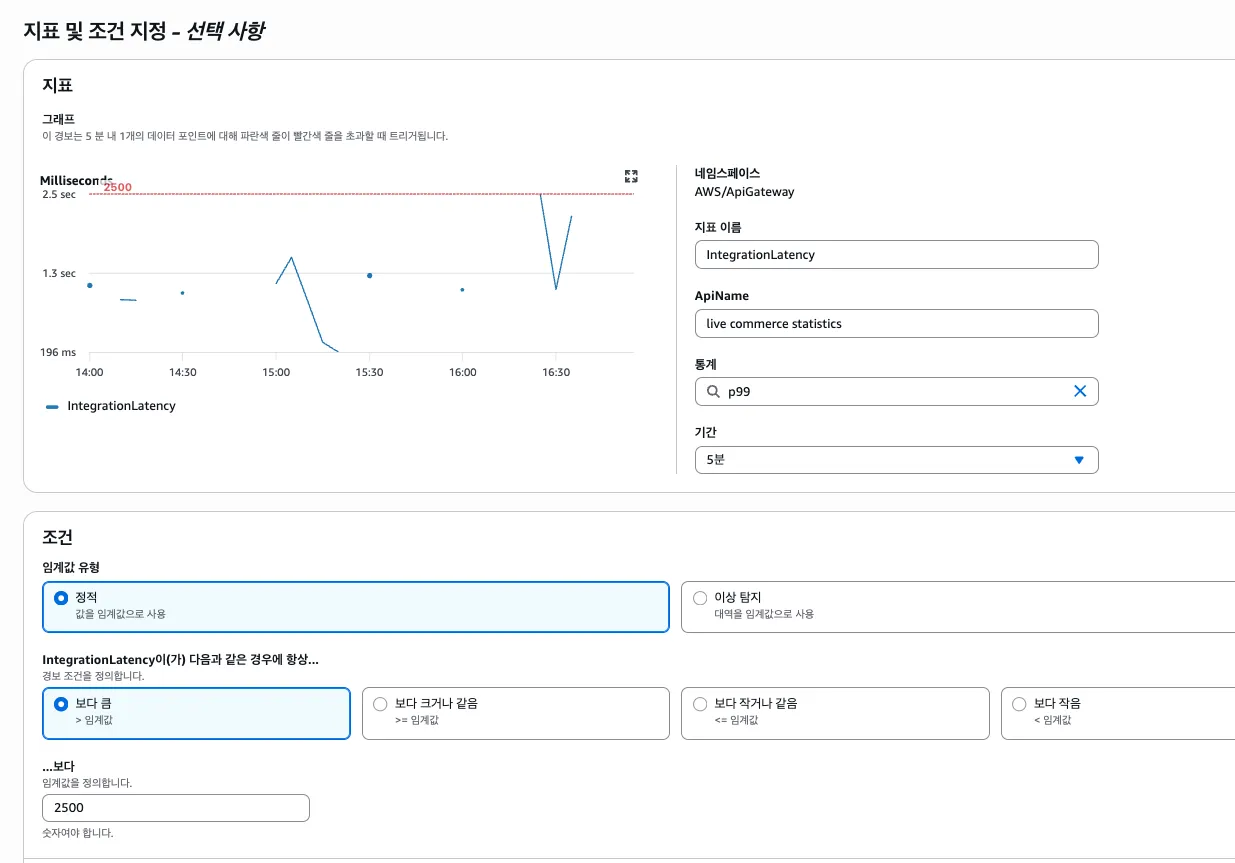
2단계 작업 구성으로 넘어오면 Lambda 작업을 선택할 수 있다. 위에서 생성한 Lambda를 선택하고 경보를 생성하면 끝이다.
테스트
Lambda 테스트로 SNS 이벤트를 전달하면 기능을 테스트 할 수 있다.
{
  "Records": [
    {
      "Sns": {
        "Message": "{\"AlarmName\":\"API-Latency-Alarm\",\"NewStateValue\":\"ALARM\",\"NewStateReason\":\"Threshold Crossed: 1 datapoint [3200.0] was greater than the threshold (2500.0)\",\"StateChangeTime\":\"2026-03-31T10:00:00.000Z\"}"
      }
    }
  ]
}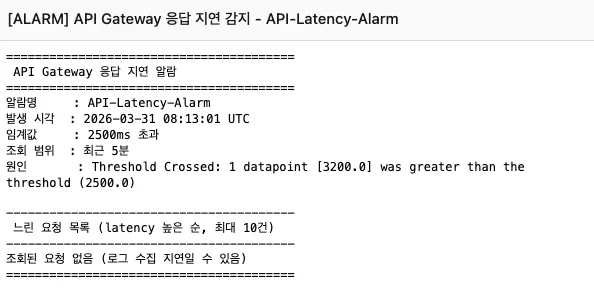
전달된 메일이다. 조회된 로그는 없다.